Engineering and Developers Blog
What's happening with engineering and developers at YouTube
3.. 2.. 1.. and you are LIVE!
Friday, December 13, 2013
Since the
YouTube Live Streaming API is announced
, we’ve seen
great
tools and apps
that helped eligible channels to stream their content on YouTube.
Now that the
YouTube Live Streaming platform is open to all verified channels
, your live streaming apps will have a wider audience than ever.
How to start integration with the YouTube Live API:
Register your application with YouTube Data API v3
Documentation
The
Getting Started
guide explains basic concepts of YouTube Live Streaming and of the API itself.
The
Life of a Broadcast
guide
walks you through the typical steps for creating and managing a live broadcast on YouTube.
The
YouTube Live Streaming Guide
identifies the encoder settings, bitrates, and resolutions that the YouTube Live Streaming platform supports.
Sample code and tools
Client libraries
for many different programming languages can help you implement the YouTube Live Streaming API as well as many other Google APIs.
Don't write code from scratch! Our
Java
,
PHP
, and
Python
code
samples
will help you get started.
The
APIs Explorer
lets you try out sample calls before writing any code.
In addition, in this video, we talk about the philosophy we followed in building the API and also show some great demos from our partners to help stimulate your creativity.
Stay tuned here and subscribe to the
YouTube for Developers
channel to keep up on the latest.
-
Satyajeet Salgar
,
Tim James
,
Ibrahim Ulukaya
and
the YouTube Live Streaming Team
Let your users discover live events and track their audience
Tuesday, October 29, 2013
YouTube Live streaming platform
enables eligible channels to stream live content on YouTube.
With the addition of live streaming content to the Data API, you can make it easier for users to find information about these live streaming events:
get search results indicating whether a video is an
upcoming
or
active
liv
e broadcast
get both
scheduled
and
actual
values of
start
and
end
time of the broadcast
get
concurrent viewer count
of a broadcast
search for live content via
eventType
filter
How to start implementing new features
The basics
The new
snippet.liveBroadcastContent
property in search results indicates whether a video or channel resource has live broadcast content. Valid property values are upcoming, active, and none.
The video resource's new
liveStreamingDetails
property is an object that contains metadata about a live video broadcast. To retrieve this metadata, include
liveStreamingDetails
in the
part
parameter value's list of resource parts when calling the
videos.list
,
videos.insert
, or
videos.update
method. The metadata includes the following new properties:
actualStartTime
,
actualEndTime
,
scheduledStartTime
,
scheduledEndTime
,
concurrentViewers
.
The
search.list
method's
eventType
parameter and the
search result
's
snippet.liveBroadcastContent
property.
Samp
le code and tools
Client libraries
for many different programming languages can help you implement the YouTube Live Streaming API as well as many other Google APIs.
Don't write code from scratch! Our
Java
,
PHP
, and
Python
code
samples
will help you get started.
The
APIs Explorer
lets you try out sample calls before writing any code.
Stay tuned here and subscribe to the
YouTube for Developers
channel to keep up on the latest.
Keep it live,
-
Derek Tan
,
Ibrahim Ulukaya
and
the YouTube Live Streaming Team
Spice up your channel with the InVideo Programming API
Wednesday, October 2, 2013
If you’ve used
InVideo Programming
before, you know that it’s a powerful way to attract subscribers to your channel. By featuring a watermark or a hit video on all videos on your channel, you can showcase the best of what your channel has to offer. You can also add a link to your home on social networks with a custom message to drive two-way conversation with your viewers on multiple fronts.
“That’s awesome,” you might say. “I’m already using it via the YouTube.com website!” Well, great! But did you know these options are available via our v3
Data API
? The API enables all kinds of interesting use cases. Some examples:
Update the message to tease your latest tweet. When users click on your link, they are taken to your Twitter page
Feature the most recent upload to
any
channel on YouTube
Run a channel about television? You can write a script to rotate the featured video depending on whether it is the afternoon or the evening, a weekday or a weekend! Or, rotate the featured video daily to drive more views, reshares and discussion of quality content that might not be as fresh
Build a widget on your website or mobile app that lets your subscribers vote for a video to be featured every week! The video doesn’t have to be a video from your channel - it can be
any
video on YouTube!
InVideo Programming options are set as part of the
channels resource
, passed as a parameter to
youtube.channels.update()
in the
invideoPromotion
field. For instance, to feature this recent “YouTube Developers Live” show featuring our team’s favorite moments, I would structure the
invideoPromotion
field in my API request’s payload body like this:
invideoPromotion": {
"items": [
{
"id": {
"type": "video",
"videoId": "
lzaYch2mqlU
"
},
"timing": {
"type": "offsetFromStart",
"offsetMs": "0",
"durationMs": "15000"
}
}
]
}
Other options for the type field in the
id
object include
website
and
recentUpload
, which correspond to InVideo Programming featuring a link, or automatically updating InVideo Programming featuring the latest video in a channel. For more information, see
the documentation describing the
invideoPromotion
object
in the channels resource.
A video featuring a watermark (top right) and InVideo Programming (bottom left)
Chances are good, though, that you’re using one of our
API client libraries
, which will help translate these API requests and responses into programmatic objects that you can manipulate and pass around in your code.
InVideo Programming functionality is relatively new, so if you are using an API client for a language like Java or .NET, you will need to make sure your client libraries are up-to-date before you can take advantage of these new features. Our samples are sorted by programming language on our
Github page
.
You can also set a channel’s watermark using the Data API’s
watermarks.set
() method. Watermarks are images that appear in the upper right hand corner of your videos that will link viewers to your channel on web and in the YouTube mobile apps for Android and iOS. This is usefu
InVideo Programming lets you reinforce your channel’s brand and drive viewers to other videos or social channels. The API makes it easy for your team to integrate InVideo Programming into your tools and workflow to make them more dynamic and interesting. Integrating the API into your tools and workflow only help to make your InVideo Programming more dynamic.
Happy coding!
-
Ikai Lan
,
YouTube API team
What to watch? Our APIs can help!
Thursday, September 12, 2013
It’s an age-old question: what to watch? Applications that integrate with YouTube have access to countless hours of videos, and, as a developer, you have an interest in helping your users find the videos and channel most relevant to them. This blog post will walk you through a few ways that you can use the
latest YouTube Data API
to discover great content.
If you have an
OAuth 2 token
for the current user, your application can make a call to
youtube.activities.list(part=”snippet”, home=true)
to get back a list of videos and channels similar to the recommendations that the user would see on the YouTube.com home page. These results are customized for each individual user, and the list is kept fresh automatically, so it’s a great way to present your users with content they’re likely to enjoy.
Even if your users are not logged in, there are still are a few charts and guides at your disposal to aid in discovery.
To find popular videos your users might want to watch,
youtube.videos.list(part=”snippet”, chart=”mostPopular”)
is the basic API call to use. By default, it will return a list of videos in any category that are considered popular globally. If this is too broad a list, though, you can narrow things down using the
regionCode
or
videoCategoryId
(or both) parameters.
regionCode
can be set to a
two-letter country code
to retrieve a list of videos popular in that specific country (though not every country is currently supported).
videoCategoryId
needs to be set to an ID corresponding to one of our existing video categories—you can retrieve a list of valid categories and their corresponding IDs via
youtube.videoCategories.list(part=”snippet”, regionCode=”
XX
”)
, where “
XX
” is also a two-letter country code.
There’s an analogous set of API calls that you could make to find channels your users might be interested in.
youtube.guideCategories.list(part=”snippet”, regionCode=”
XX
”)
will return a list of all the channel categories that are available in a given country. Once a user has chosen a category, you can get back a list of the most relevant channels in that category via a call to
youtube.channels.list(part=”snippet”, categoryId=”
CATEGORY_ID
”)
, where “
CATEGORY_ID
” is the ID of the guide category you’re interested in. At that point, you could display a list of the most recent videos associated with each channel, and give your users the option of subscribing (assuming they grant OAuth 2 authorization first).
All of these examples assume that you’re using the latest version of the
YouTube Data API, v3
. Developers still using the Data API v1 or v2 should be aware of some recent changes to our older content discovery mechanism, standard feeds.
As explained in the documentation
, all of the previous different types of standard feeds are now returning the equivalent of the
most_popular
feed, with the
time
parameter set to “today”. If you are still using v1 or v2, there’s no time like the present (
time=”today”
, if you will) to make the switch to v3.
Update
:
For a walkthrough and demos of all the API calls, please watch this episode of YouTube Developers Live:
Cheers,
—
Jeff Posnick
,
YouTube API Team
Here’s my playlist, so submit a video, maybe?
Wednesday, August 28, 2013
Update:
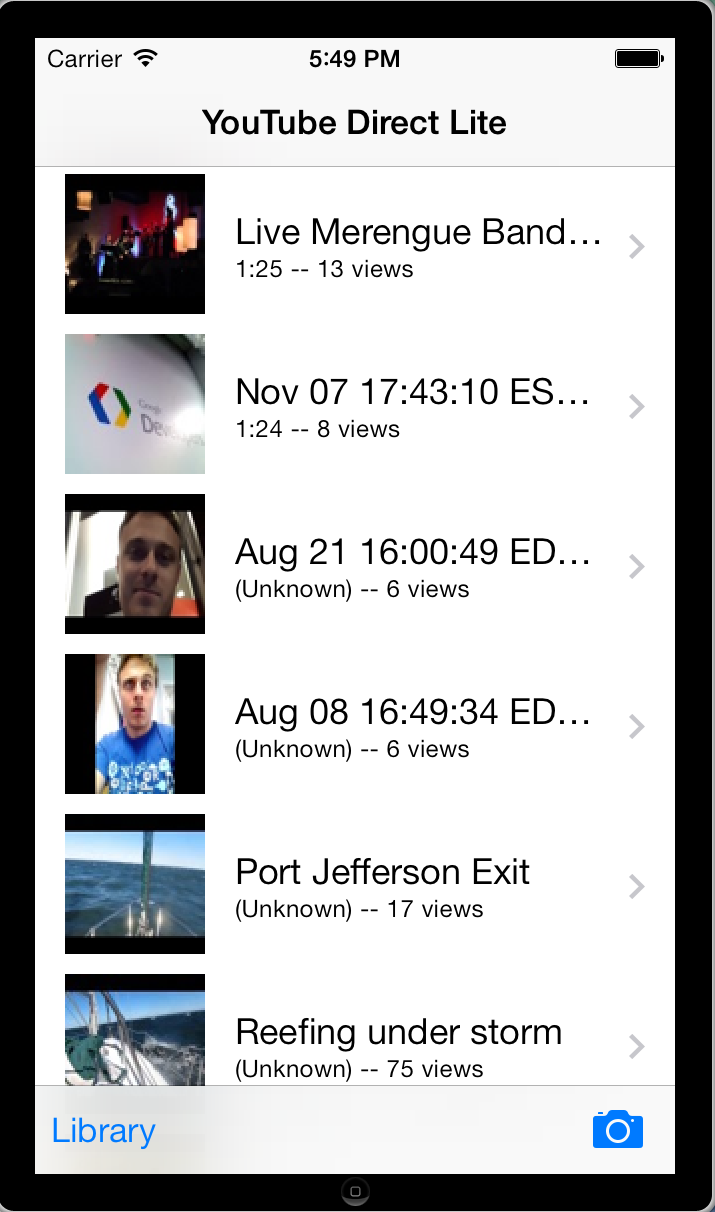
YouTube Direct Lite for iOS
is now available as well. This version demonstrates best practices for using the YouTube APIs on iOS.
YouTube Direct Lite
allows you to solicit videos from your users and then moderate those submissions into standard YouTube playlists for display. And now there is an app for that.
With the YouTube Direct Lite apps (
Android
,
iOS
)
, your fans can
record a new video,
upload an existing video from their device,
pick one of their own YouTube uploads
and submit to your playlist, all from their Android device. You can then moderate their submissions, which won't show up in your playlist till you explicitly approve them.
YouTube Direct Lite platform
doesn’t require any server-side code that needs to be configured or deployed. As the
moderator
, you will see a playlist of videos waiting for your approval. The videos you approve, will be added into your channel.
How to start using the Android application
1)
Register your Android app
2) Enable the Youtube Data API v3 and Google+ API in your
API Console
.
3) Include the
Google Play Services library
in your project to build this application.
4) Plug your Playlist Id into
Constants.java
and Android API Key into
Auth.java
Main Activity
YouTube player
Upload Service
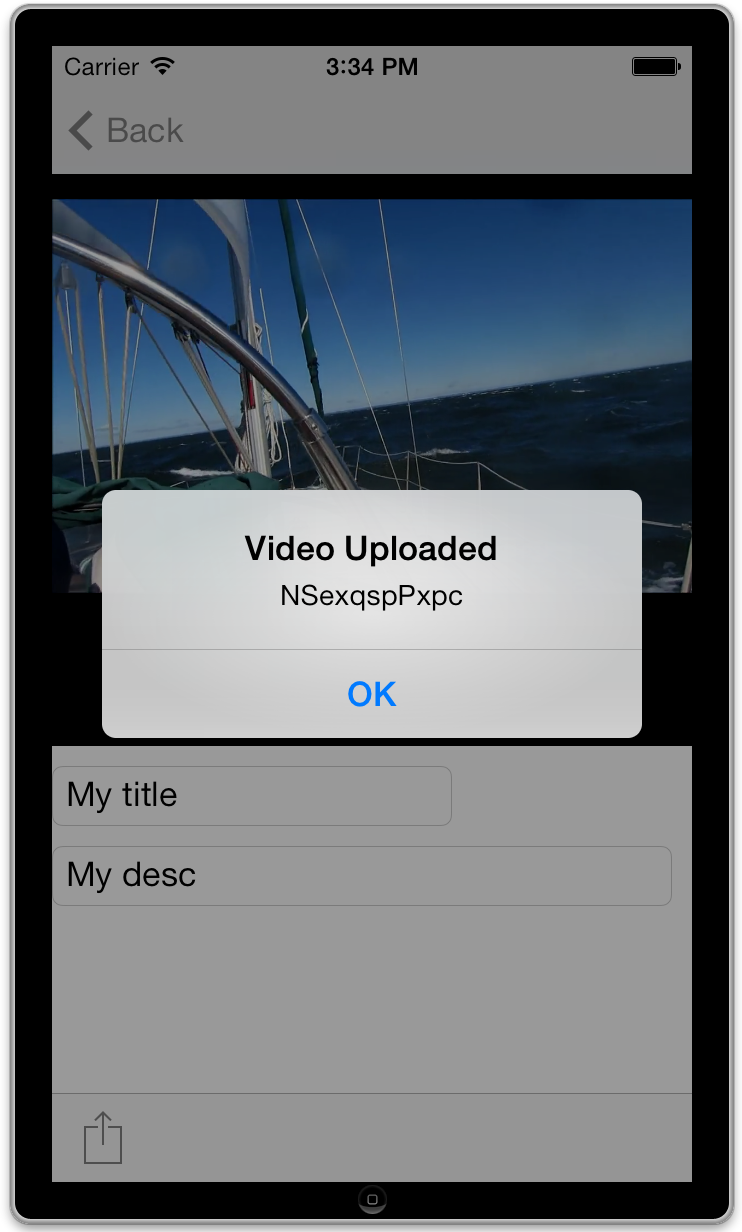
How to start using the iOS application
1)
Enable the YouTube Data API
2) Plug your Playlist Id, Client ID and Client Secret into
Utils.h
2) Install the
Google Client Library
.
3) Run the sample
Uploads Playlist
iFrame Player
YouTube Upload
Open-sourced to reference best practices of YouTube APIs on Android and iOS
YouTube Direct Lite apps (
Android
,
iOS
) are open-sourced projects and you are more than welcome to customize them for your needs. You can also contribute back to the projects with bug reports, feature or merge requests.
Android
application uses the
YouTube Data API v3
,
YouTube Android Player API
,
YouTube Resumable Uploads
,
Google Play Services
and
Plus API
.
In addition to Android best practices for the YouTube APIs, this project follows the
design and development guidelines for Android
. This project adheres to
Holo style
,
typography
,
48dp rhythm
,
iconography
and uses
IntentService
,
BigPictureStyle notification
, and
GoogleAccountCredential
.
iOS
application uses the
YouTube Data API v3
, the
YouTube iFrame Player API
, and
YouTube Resumable Uploads
.
In addition, in these videos, we talk about the philosophy we followed in building these apps and a few best practices for the Youtube APIs, Android, and iOS development.
This App is still experimental, so stay tuned here and subscribe to the
YouTube for Developers
channel to keep up on the latest.
Cheers,
—
Ibrahim Ulukaya
, YouTube API Team
Labels
.net
acceleration
access control
accessibility
actionscript
activities
activity
android
announcements
apis
app engine
appengine
apps script
as2
as3
atom
authentication
authorization
authsub
best practices
blackops
bootcamp
captions
categories
channels
charts
chrome
chromeless
client library
clientlibraries
clientlogin
code
color
comments
compositing
create
curation
custom player
decommission
default
deprecation
devs
direct
discovery
docs
Documentation RSS
dotnet
education
embed
embedding
events
extension
feeds
flash
format
friendactivity
friends
fun
gears
google developers live
google group
googlegamedev
googleio
html5
https
iframe
insight
io12
io2011
ios
iphone
irc
issue tracker
java
javascript
json
json-c
jsonc
knight
legacy
Live Streaming API
LiveBroadcasts API
logo
mashups
media:keywords keywords tags metadata
metadata
mobile
mozilla
news
oauth
oauth2
office hours
open source
partial
partial response
partial update
partners
patch
php
player
playlists
policy
previews
pubsubhubbub
push
python
quota
rails
releases
rendering
reports
responses
resumable
ruby
samples
sandbox
shortform
ssl https certificate staging stage
stack overflow
stage video
staging
standard feeds
storify
storyful
subscription
sup
survey
tdd
theme
tos
tutorials
updates
uploads
v2
v3
video
voting
watch history
watchlater
webvtt
youtube
youtube api
youtube developers live
youtube direct
ytd
Archive
2015
December
Chat it up, streamers! New Live Chat, Fan Funding ...
November
October
May
April
March
January
2014
October
September
August
May
March
2013
December
October
September
August
July
June
May
April
March
February
2012
December
November
September
August
July
June
May
April
March
February
January
2011
December
October
September
August
July
June
May
April
March
February
January
2010
December
November
October
September
July
June
May
April
March
February
January
2009
November
October
September
August
July
June
May
April
March
February
January
2008
December
November
October
September
August
July
June
May
April
March
February
2007
December
November
August
June
May
Feed
YouTube
on
Follow @youtubedev